Amazon Aurora Global Database
Introduction
Amazon Aurora Global Database is a powerful database solution that helps businesses run their applications worldwide. This guide will explain how to get started with Aurora in simple terms.
What is Amazon Aurora?
Amazon Aurora is a cloud database that's fully managed by AWS. It's compatible with MySQL and PostgreSQL but works up to five times faster than standard MySQL and three times faster than standard PostgreSQL. You can learn more about Aurora basics here: Amazon Aurora Overview
Understanding Aurora Global Database
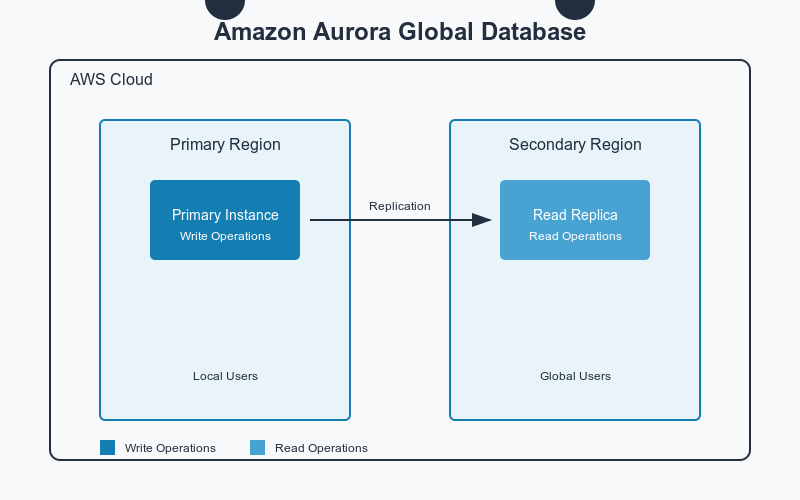
Think of Aurora Global Database as having copies of your database in different parts of the world. Your main database (called the primary region) handles all write operations, while other regions (called secondary regions) can handle read operations. This setup helps in two main ways:
It makes your application faster for users around the world
It protects your data if something goes wrong in one region
Key Benefits
When you use Aurora Global Database, you get:
Fast local reads with less than one second delay worldwide
Protection against regional failures
The ability to move your database to a different region in under a minute if needed
Support for large databases up to hundreds of terabytes
Getting Started
Step 1: Set Up Your Primary Database
First, create your main Aurora database cluster in your chosen primary region. You can do this through the AWS Management Console by visiting: Create Aurora Database
Step 2: Add Secondary Regions
After your primary database is running:
Open the Amazon RDS console
Select your database cluster
Choose "Add AWS Region" from the Actions menu
Pick the regions where you want copies of your database
Step 3: Connect Your Application
You'll get different endpoints for writing and reading:
Use the primary endpoint for all write operations
Use the reader endpoint in each region for read operations
Best Practices
To get the most out of Aurora Global Database:
Place secondary regions close to where your users are located
Monitor replication lag using Amazon CloudWatch
Test failover procedures regularly
Use appropriate instance sizes in each region based on your workload
Costs and Planning
Remember that you pay for:
Database instances in each region
Storage in each region
Data transfer between regions
You can estimate costs using the AWS Pricing Calculator
Next Steps
To dive deeper into Aurora Global Database, visit these resources:
Conclusion
Amazon Aurora Global Database makes it simple to run worldwide applications with fast performance and strong reliability. Start small by setting up your primary region, then expand to other regions as your needs grow.
For hands-on experience, try the Aurora Global Database Workshop or contact AWS Support if you need help getting started.
About the author
I am a Software Developer from Italy.
Comments
Join the discussionNo comments yet. Be the first to comment.